Click to see the formatting options for the User Transaction Log report.
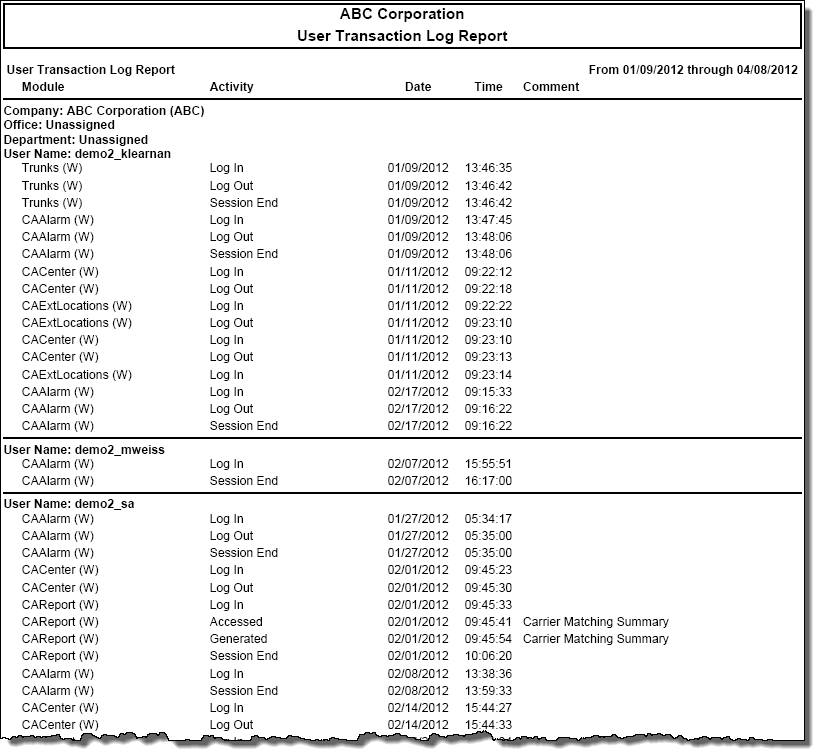
The User Transaction Log report provides information on which modules users access, what report modules are selected and which reports are generated.
Click to see the formatting options for the User Transaction Log report.
At the Required Constraints tab of the Execute/Define Reports screen, specify the date and time settings for the report.
At the Additional Constraints tab, the default constraints for a User Transaction Log report are:
Home Site
Each organizational level you defined when installing the product
Owner Name
Click the Add Additional Constraints list box to include more constraints in your search criteria.
At the Options tab, the options available will not be the same from one report type to another. Only those options that apply to the selected report will appear. The options available with the User Transaction Log report are:
Group by Code Instead of Name: This check box controls how organizational reports are organized. If it is selected, grouping is done by organization code. If the check box is not selected, grouping is done by organization name.
Show report parameters on 1st page: If you select this check box, then a header page for a report will be created. This page displays the options selected, filters, and other settings that went into making up the report.
At the Layout tab, the options available will not be the same from one report type to another. Only those options that apply to the selected report will appear. The options available with a User Transaction Log report are:
Summarize/Group on this Level and Above: This list box contains a list of grouping levels. When you select a level, the report will summarize on that level and all levels above it. The level you choose collapses into a single summation line. The summarizing levels available with a User Transaction Log report are:
Home Site/Organization/Owner
Organization/Owner
Page Break: This list box contains a list of grouping levels. When you select a level, you specify on which grouping level to force a page break. The following page break choices are available with a User Transaction Log report:
No forced page breaks (default)
Each organizational level you defined when installing the product
Owner Name
Sort Fields: This list box displays all of the fields in the User Transaction Log report that can be sorted. Select the field on which you want to sort the report, and the direction you want it sorted. The fields you can sort on with a User Transaction Log report are:
Call Date & Time (default)
Duration
Billed Cost
Base Cost
Call Type
Facility Name
Phone Number
Extension
Auth Code
Account Code
Click to see the report details for the User Transaction Log report.
The columns of a User Transaction Log report are:
Module: This column lists the module that was accessed.
Activity: This column lists what action was performed within the module.
Date: This column lists the date the module was accessed.
Time: This column lists the time the module was accessed.
Comment: This column lists any supplementary information about the activity in the module.
Click to view a sample User Transaction Log report.